


Project, task, and status tracking for growing teams
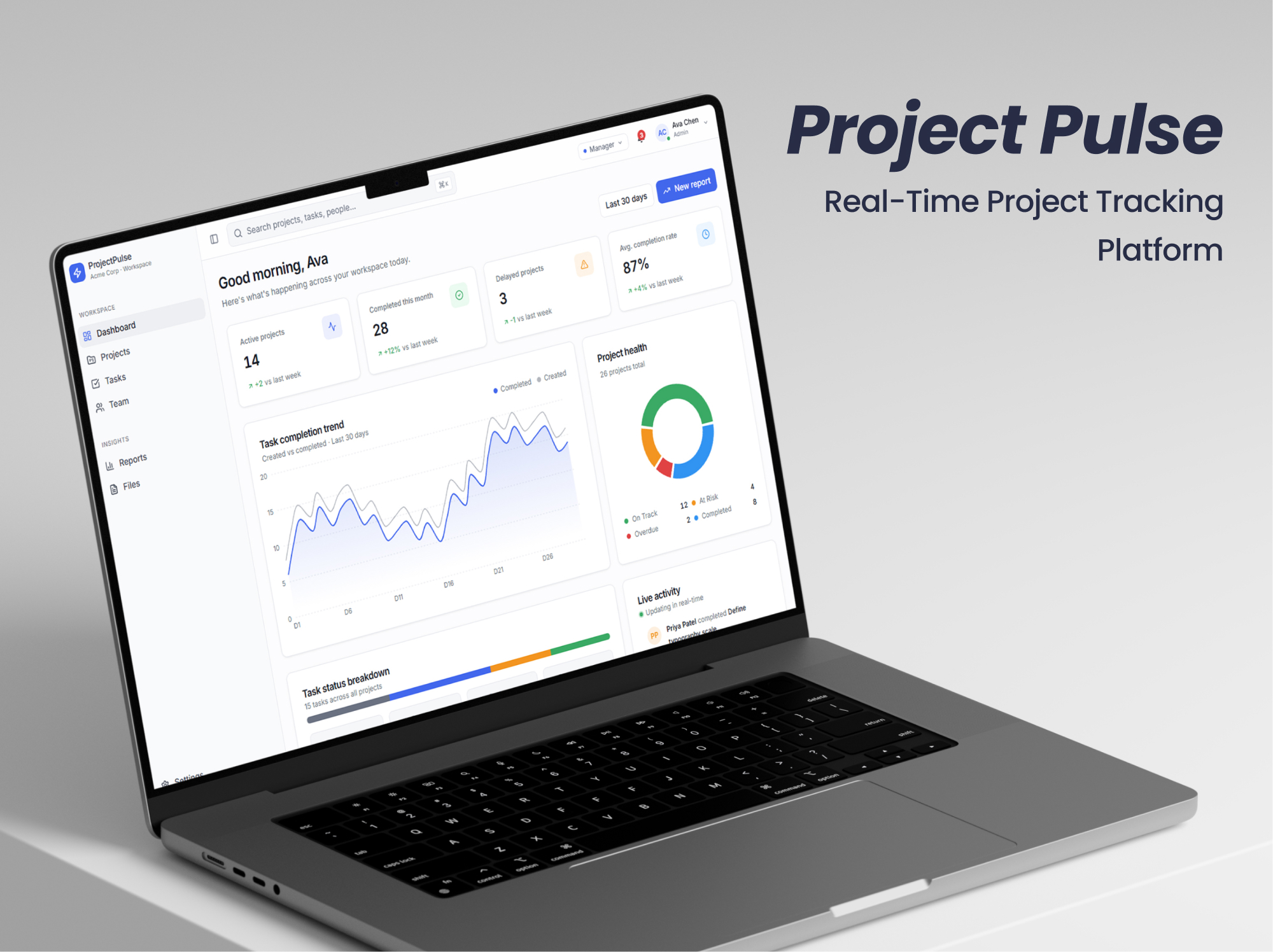
ProjectPulse is a SaaS workspace for projects, tasks, and collaboration. Growing teams replace spreadsheets and disconnected tools with one place to track progress, ownership, and deadlines in real time.
60%
Less manual project tracking effort
<1 hr
Weekly status updates, down from 3 hours
35%
Higher task completion rate
40%
Increase in team productivity
The problem
The client was managing projects through spreadsheets, emails, and multiple tools. As the team grew, delays, limited visibility, and poor coordination became the default.
Spreadsheets and inboxes cannot give each person the right view of the work. Status lives in the last email, ownership is unclear, and leaders cannot see risk until a deadline is already missed.
- No single source of truth for projects and tasks
- Difficulty tracking progress and ownership
- Time lost in manual follow-ups and status updates
- Limited visibility into deadlines, performance, and risks
- No shared dashboard for live progress and project health
- Roles were not set up so admins, managers, and team members saw the right work
- Reporting meant assembling a status pack by hand each week
What we changed
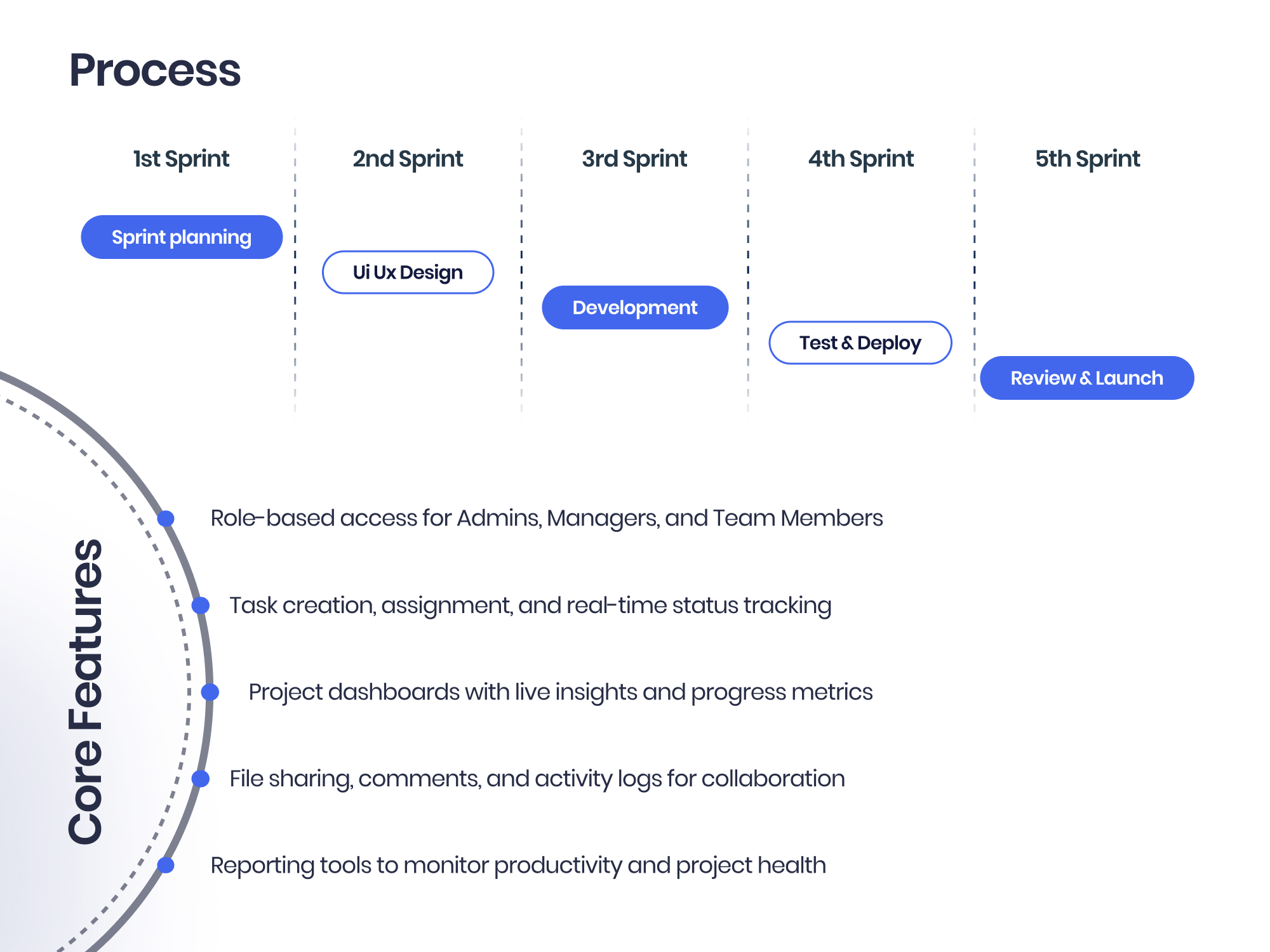
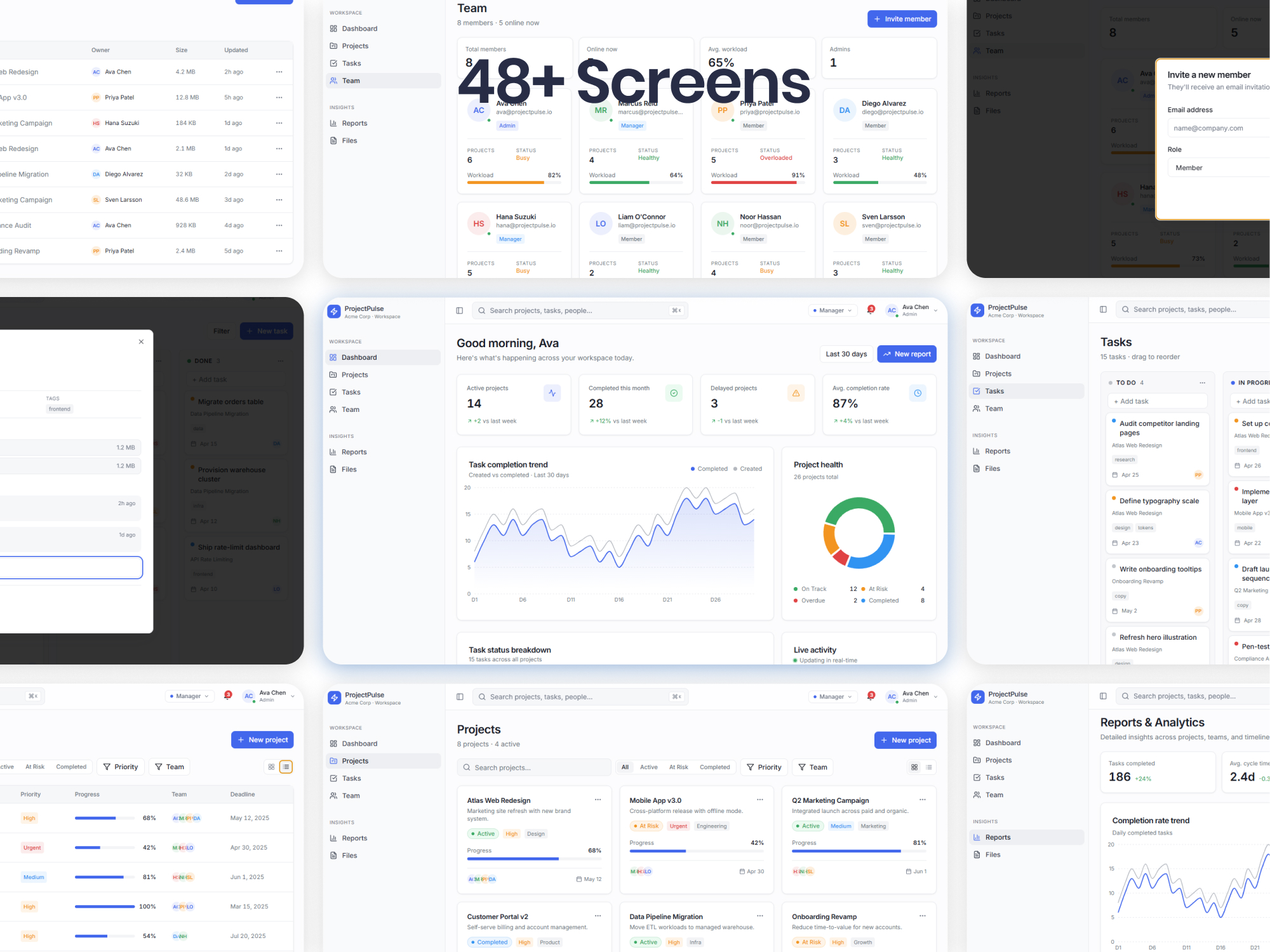
We designed and built ProjectPulse as a modern web application using ASP.NET Core and Angular. Projects, tasks, reporting, and communication sit in one system, with each user seeing the right level of visibility and control.
- Role-specific access for admins, managers, and team members
- Task creation, assignment, and real-time status tracking
- Project dashboards with live insights and progress metrics
- File sharing, comments, and activity logs for collaboration
- Reporting tools to monitor productivity and project health
People still assign work, accept a status change, and close a project. The product shows progress. A named role still owns the decision.
What changed in the numbers
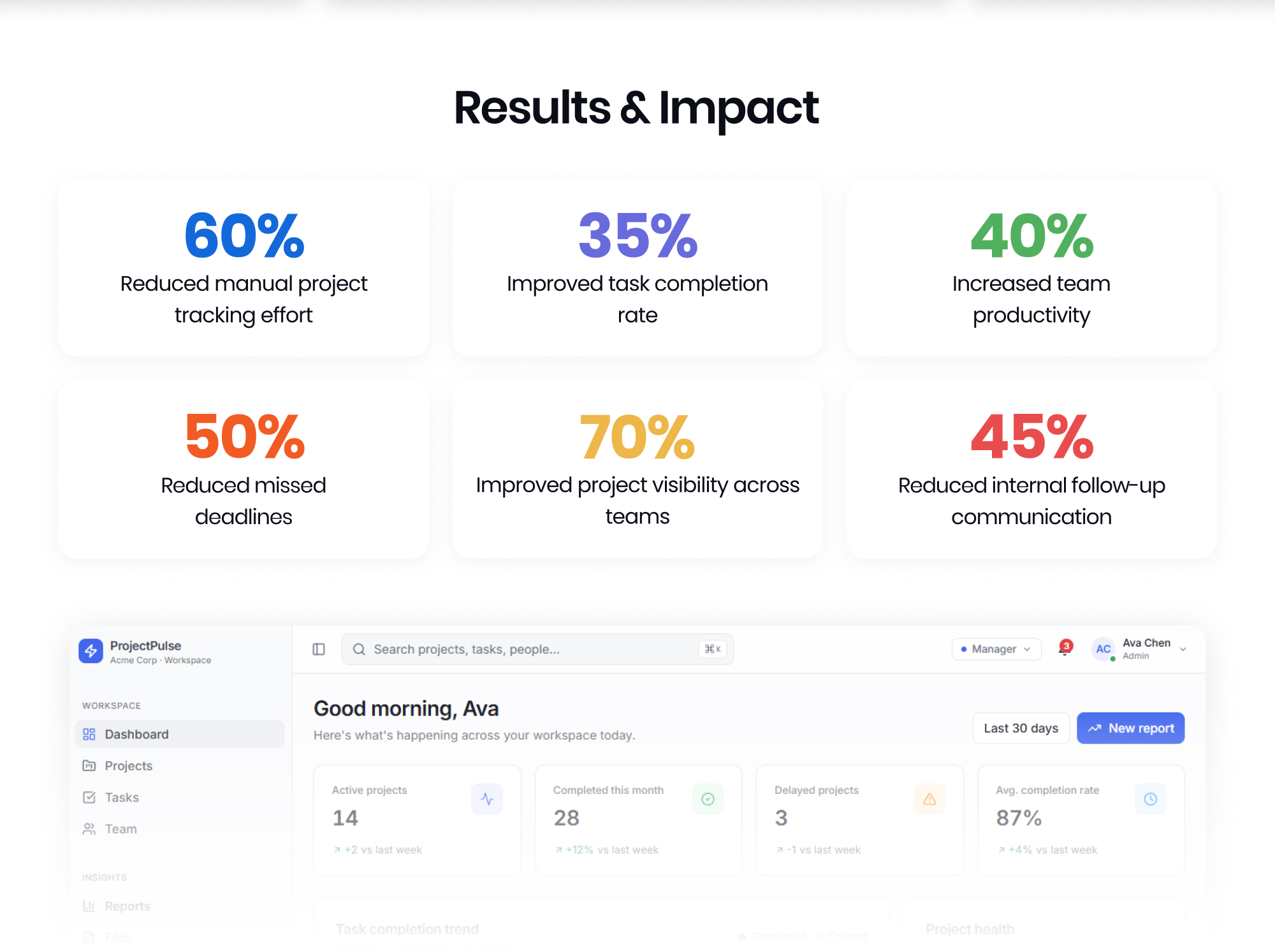
60%
Less manual project tracking effort
<1 hr
Weekly status updates, down from 3 hours
35%
Higher task completion rate
40%
Increase in team productivity
50%
Fewer missed deadlines
70%
Better project visibility across teams
45%
Less internal follow-up communication
3x
More active projects without extra management overhead
ProjectPulse replaced the spreadsheet chase with one workspace. Status is visible, ownership is clear, and we run more projects without adding a layer of follow-up.
ProjectPulse
What this means for you
- Project software only helps if status, ownership, and files share one record
- Growing teams need role-specific views before a prettier spreadsheet
- Weekly status packs are a symptom: the live dashboard should replace the chase
- You can run more projects without more managers once visibility is built in
Questions people ask
Projects, tasks, ownership, live status, files, comments, and reporting in one workspace. Admins, managers, and team members see the work that matches their role instead of chasing updates by email.
It is built for that daily job: a single source of truth, live progress, and project-health reporting. Teams still talk. They stop assembling a three-hour status pack every week.
A named role still assigns work, accepts a status change, and closes a project. The product records progress. People own the decision.
Ready for a similar result?
Short assessment
Book a short assessment
We look at one live workflow and tell you whether this pattern fits, before you add another tool.
See if this fits our operationSend a note
Talk through a similar workflow
Tell us about the job your team already does. Use the form at the bottom of this page. No new login.
Talk through a similar workflowHow it works
What we chose to automate
Once projects, tasks, and activity share one record, later helpers can flag slipping deadlines, suggest owners, or draft a status note. The first job is a trusted live workspace, not a chatbot on the side.
- Keep projects, tasks, and comments on one timeline
- Give managers the same status the team sees, without a follow-up chase
- Leave room for routing and summaries once the record is trusted
How the pieces fit together
ASP.NET Core APIs with an Angular workspace keep project, task, and reporting screens in one product. Access by role means people see the work that matches their job, not a shared spreadsheet of everything.
- Web application for projects, tasks, and reporting
- Access by role for admins, managers, and team members
- Live dashboards, activity logs, and status updates
When a person still takes over
People still assign work, accept a status change, and close a project. The product shows progress. A named role still owns the decision.
- Managers assign and reassign tasks; the system records the change
- Admins control who can see which projects
- Activity history so outstanding work is not guessed from email
What it connects to
- Project and task records in one workspace
- File sharing and comments on the same thread
- Activity logs and status history
- Productivity and project-health reporting
Still running projects from spreadsheets and inboxes?
If status lives in email and ownership is unclear, we can look at a project workspace like ProjectPulse.
RELATED WORK
Related case studies, services, and guides
SaaS Platforms
Learn moreWe help software companies add AI to the product they already run, and update older code so new features ship safely. Your customers get smarter features, your live product stays stable, and nobody has to start over.
SaaS development
Learn moreExplore related Solvefy services, resources, and proof for operational AI modernization.
Web app development
Learn moreExplore related Solvefy services, resources, and proof for operational AI modernization.
Custom software development
Learn moreExplore related Solvefy services, resources, and proof for operational AI modernization.
Workflow automation assessment
Learn moreWe analyze manual bottlenecks, data handoffs, and approval loops across your core operational processes. You receive an prioritized automation roadmap that integrates human in the loop control points, permission-aware execution, and structured exception handling directly into your existing software.