


An AI agent can complete a task, use external tools, and make decisions across multiple steps. That sounds impressive in a demo. Making it work reliably inside a real business is a different challenge.
An agent might retrieve the wrong customer record, repeat the same tool call, exceed its budget, or make a decision without enough context. The model may be capable, but the system around it can still fail.
That is why building AI agents involves more than choosing a model and writing a prompt. You need a way to control what the agent can access, how it handles information, how you measure its results, and when a human must step in.
This guide explains how to build reliable AI agents, choose an appropriate AI agent framework, manage operating costs, and prepare agentic workflows for production.
Key Takeaways
- AI agents need clear instructions, limited tool access, and measurable success criteria.
- Context management helps agents retain useful information without carrying unnecessary history into every step.
- Automated tests should handle predictable outcomes, while independent evaluation can help with more subjective tasks.
- Token limits, iteration caps, and timeouts help prevent runaway AI costs.
- Sandboxing, scoped permissions, and human approval reduce the risk of unwanted actions.
- The right AI agent framework depends on your workflow, existing technology, and required level of control.
- Reliable business automation depends on data quality and clearly defined processes as much as model capability.
1. What Is an AI Agent?
An AI agent is a software system that uses an AI model to pursue a goal by choosing actions, using tools, and responding to the results.
A conventional chatbot usually responds to a prompt. An AI agent can take several steps toward completing a task.
For example, a customer support agent might:
- Read a customer's request.
- Retrieve the relevant account information.
- Check the company's support policies.
- Prepare a response or recommend an action.
- Ask a human to approve a sensitive decision.
The agent is not simply generating text. It is interacting with systems to move a process forward.
This creates opportunities for AI automation in customer service, HR operations, sales, software development, research, and internal business processes.
It also introduces new risks. Every additional tool call, decision, and system interaction creates another opportunity for an incorrect action.
What is agentic AI?
Agentic AI refers to AI systems designed to pursue goals through actions and multi-step workflows, rather than only generating a response to a single instruction.
The important distinction is the level of autonomy.
An agent that drafts an email for review has limited authority. An agent that sends the email, updates a customer record, and triggers another workflow has much more.
The more authority an AI agent receives, the more carefully its permissions, evaluation, and approval rules need to be designed.
2. Why AI Agents Fail After the Demo
A successful demonstration usually proves that a system can complete one carefully selected task.
Production software must handle many more situations: incomplete information, unexpected inputs, unavailable services, conflicting records, and users with different permissions.
Several problems commonly appear when AI agents move into real workflows.
Uncontrolled execution
An agent may repeat an action because the result does not match its expectations. Without a limit on retries or execution time, a small issue can become an expensive loop.
Missing or excessive context
An agent may not receive the information needed to make a correct decision. Alternatively, it may receive so much conversation history and tool output that important details become harder to use.
Weak evaluation
A model can produce an answer that sounds convincing without meeting the actual business requirement. If the system only checks whether the response exists, it may approve an incorrect result.
Excessive permissions
An agent with broad access can cause more damage when it makes a mistake. Access to a production database, for example, should not automatically mean permission to change every record.
Poor business data
Duplicate records, outdated documentation, missing product details, and undocumented business rules can undermine even a capable AI model.
These problems share a common theme: the agent needs a controlled environment, not just a better prompt.
3. What Is an AI Agent Harness?
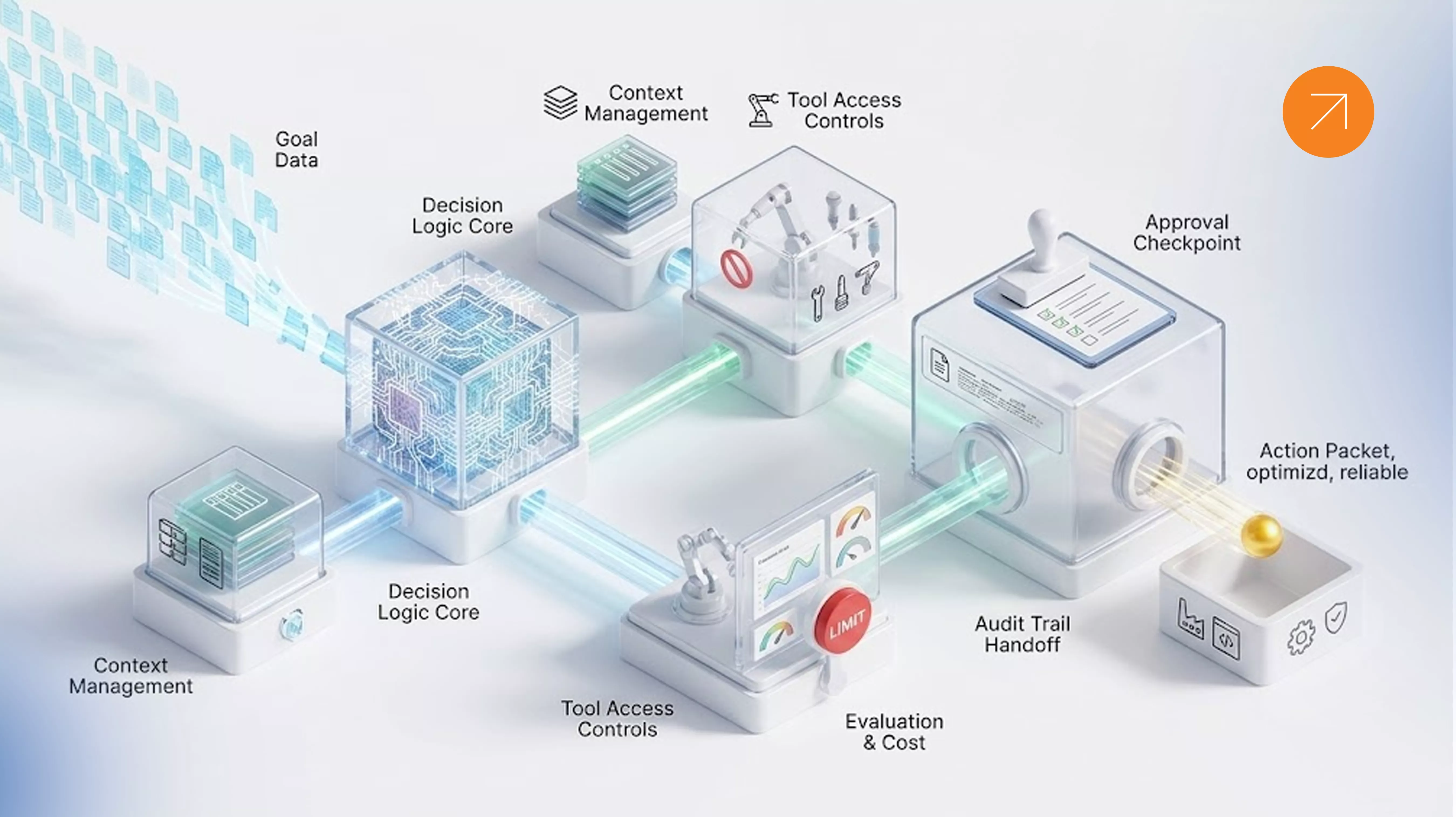
An AI agent harness is the runtime environment and set of controls surrounding an AI model. It manages how the agent receives context, uses tools, evaluates results, handles limits, and requests approval.
Think of the model as the decision-making engine. The harness defines the operating conditions.
A practical AI agent harness can include six components.
- Context manager. Controls which information the agent receives and how useful information is retained between steps.
- Task and action controller. Defines the task, available tools, execution sequence, and conditions for stopping.
- Evaluator. Checks whether the result meets the required criteria. Depending on the task, this may be a conventional test suite, deterministic validation, a separate AI evaluator, or human review.
- Tool sandbox. Restricts access to files, networks, services, and other resources so an agent cannot freely interact with systems beyond its intended scope.
- Cost and execution limits. Sets token budgets, maximum iterations, and timeouts to keep execution predictable.
- Human review gate. Requires approval before high-impact actions, such as sending sensitive communications, changing important records, merging code, or deploying software.
Not every AI agent needs every component at the same level. A simple classification assistant has different requirements from an agent that changes financial or operational records.
The objective is to introduce controls that address real risks without making the workflow unnecessarily complicated.
4. How to Manage Context in Long-Running AI Agents
Context management becomes important when an agent works across many steps or sessions.
A long-running task may generate tool outputs, intermediate decisions, logs, and new instructions. Passing all of that information into every model call can increase costs and make relevant details harder to identify.
Research on context engineering from Anthropic explores the importance of selecting and maintaining useful information for an agent.
Two common strategies are context compaction and context resets.
Context compaction summarizes or reduces older information while preserving useful details.
Context reset starts a fresh execution context and provides a structured handoff containing the goal, decisions, current state, outstanding problems, and next action.
Compaction can preserve continuity. A reset can help when an agent is repeatedly losing focus or carrying irrelevant history forward.
Neither approach should be selected simply because it is popular. Test how your chosen model behaves during longer tasks and use the strategy that produces reliable results.
For multi-session work, keep progress notes structured and explicit. Record what has been completed, what remains, which decisions have been made, and what must not change.
5. How to Evaluate AI Agent Performance
A successful AI agent must do more than produce plausible answers. It must meet the requirements of the task consistently.
Start by defining what success means before building the workflow.
For a customer support agent, success might mean that the answer follows company policy, uses the correct account information, and avoids making unauthorized commitments.
For a software development agent, success might mean that the code passes tests, follows security requirements, and changes only the intended parts of the application.
Use deterministic tests wherever possible
If the result can be checked with a rule or automated test, start there.
Examples include:
- Whether a required field is present.
- Whether a database record matches the correct customer.
- Whether a calculation returns the expected value.
- Whether a software change passes its test suite.
- Whether an action stays within an allowed permission scope.
These checks are often more predictable than asking another model to judge the result.
Add an independent evaluator when needed
Some outcomes are harder to measure with simple tests. A research summary, customer-facing explanation, or design proposal may require judgment against several quality criteria.
In these cases, a separate evaluator can help assess the result.
However, an evaluator can also miss defects or approve weak work. Test it using examples with known errors, compare its decisions against human reviewers, and monitor its performance over time.
Avoid unnecessary evaluation loops
Repeatedly asking AI to review its own work can increase latency and cost without guaranteeing better results.
Use a simple decision process:
- Can a test verify the outcome? Use the test.
- Is the outcome subjective or high-risk? Consider a separate evaluator and human review.
- Is the task straightforward but not fully testable? Use a limited evaluation pass.
- Does the result fail? Retry only when there is a clear correction strategy.
Evaluation should reduce meaningful risk, not create activity for its own sake.
6. How to Control AI Agent Costs
AI agent costs can grow quickly when a workflow involves repeated model calls, large context windows, external tools, and multiple evaluation passes.
A task that looks inexpensive in isolation may become costly when the agent repeats it hundreds of times.
Three controls provide a practical starting point.
- Token budget: Set a maximum amount of model usage for an individual task.
- Iteration limit: Restrict the number of times the agent can repeat its execution or evaluation cycle.
- Execution timeout: Stop tasks that exceed a reasonable time limit.
You should also track cost at the workflow level.
Measure cost per completed task, not just the price of an individual model call. Include retries, evaluator calls, tool usage, and failed executions in your calculations.
For example, if an AI agent processes customer requests, compare the total operating cost against the number of requests successfully resolved. A workflow that uses fewer tokens but produces more errors may not be cheaper in practice.
Review the results regularly and simplify the workflow when the data shows that extra steps are not improving quality.
7. How to Choose an AI Agent Framework
An AI agent framework provides tools for building, orchestrating, and managing agent workflows. The right choice depends on how much control you need and which technologies your team already uses.
| Framework | Consider it when |
|---|---|
| Claude Agent SDK | You want an established agent loop and tool-oriented workflows for coding and file-based tasks. |
| OpenAI Agents SDK | You want to build agent workflows with handoffs, guardrails, and tracing within the OpenAI ecosystem. |
| LangGraph | You need explicit workflow control, state management, and resumable execution. |
| Microsoft Agent Framework | Your application relies on Microsoft technologies, .NET, or Azure. |
| Google ADK | You are building agent applications around Google's ecosystem or need its supported development patterns. |
| CrewAI | You want to organize workflows around collaborating agents with defined roles. |
Capabilities evolve, so verify current documentation, licensing, supported languages, and deployment requirements before choosing a framework.
Which AI agent framework should you use?
There is no single best framework for every project.
If you need a narrowly scoped coding agent, a framework with built-in tool permissions and context handling may reduce setup work.
If your workflow contains many explicit stages, dependencies, and recovery points, a graph-based approach may give you more control.
If your team already operates within a mature .NET or Azure environment, compatibility with existing systems may matter more than having the largest collection of agent features.
Before committing, build a small proof of concept and evaluate it against the same task, test cases, cost limits, and recovery scenarios.
Choose based on operational fit rather than popularity alone.
8. How to Make AI Agents Safer in Production
An AI agent should not automatically receive unrestricted access simply because it can use a tool.
Start with the minimum permissions needed to complete the task.
Isolate execution
Run code and potentially risky actions in a controlled environment. Keep production credentials out of untrusted execution contexts.
Restrict tool access
Allow only the required files, services, network destinations, and operations. Read access should not automatically imply write access.
Require approval for high-impact actions
Use human approval when the agent is about to perform an irreversible or sensitive action. The exact approval points depend on the business process and the potential consequences of an error.
Keep an audit trail
Record important actions, tool calls, outcomes, and approval decisions. Logs should help the team understand what happened and investigate failures without unnecessarily exposing sensitive information.
Test failure scenarios
Simulate unavailable APIs, invalid inputs, permission failures, and interrupted execution. Confirm that the agent stops safely or recovers according to a defined policy.
These controls are particularly important when AI agents interact with customer information, HR records, financial systems, source code, or production infrastructure.
9. A Practical Example: Automating a Quotation Workflow
Consider a company that prepares product quotations manually.
An employee receives a request, checks product information, confirms quantities, reviews pricing, considers delivery options, and prepares a quotation for approval.
An AI agent could help gather the relevant information, assemble a draft, identify missing details, and prepare the result for a human reviewer.
But the agent's reliability would depend on more than its ability to understand the request.
It would also need accurate product data, clear pricing rules, access to the correct records, and a way to handle missing information.
A practical implementation might follow this sequence:
- Receive: Read the quotation request and identify required details.
- Retrieve: Look up relevant product and customer information through approved tools.
- Validate: Check required fields, pricing constraints, and inconsistencies.
- Prepare: Generate a draft quotation with supporting information.
- Review: Send uncertain or high-impact decisions to an authorized employee.
- Record: Save the approved result and log the actions taken.
The workflow should not silently invent missing prices or send a quotation when critical information is unavailable.
Start by automating information gathering and drafting. Measure completion time, correction rates, cost per request, and the percentage of drafts approved without major changes. Expand the agent's authority only when the evidence supports it.
This is how to approach AI automation as a business process improvement rather than simply adding a model to an existing application.
10. A Step-by-Step Plan to Build Reliable AI Agents
If you are planning to build AI agents for your organization, start with a narrow, measurable workflow.
- Define the business problem. Identify the task, its current cost, the people involved, and what a successful result looks like.
- Set the agent's boundaries. Specify what it can read, change, decide, and request from a human.
- Choose the minimum required tools. Start with only the integrations needed to complete the task.
- Establish a baseline. Create test cases for normal requests, missing information, incorrect inputs, and failure conditions.
- Add execution limits. Set token budgets, timeouts, and iteration caps before running long or expensive tasks.
- Introduce evaluation. Use automated tests first, then add independent evaluation or human review where the task requires judgment.
- Deploy in a controlled environment. Monitor results before granting access to sensitive systems or expanding the agent's authority.
- Review and improve. Track failures, cost, latency, accuracy, and human intervention. Re-test the workflow whenever you change the model, tools, or core instructions.
A small agent with clear boundaries and measurable results is often a better starting point than a large autonomous system that is difficult to test.
Frequently Asked Questions
What is an AI agent used for?
AI agents can support tasks such as customer service, research, software development, document processing, HR operations, and business workflow automation. Their suitability depends on the task, available data, required integrations, and acceptable level of autonomy.
What is the difference between AI agents and AI automation?
AI automation can use predefined rules to execute repetitive tasks. AI agents can use a model to select actions and work through changing situations toward a goal. Many real-world systems combine both approaches.
How do you build an AI agent?
Define a task, select a model, provide the minimum required tools and context, establish success criteria, and add controls for permissions, costs, evaluation, and human review. Test the workflow before connecting it to production systems.
Which AI agent framework is best?
The best AI agent framework depends on your application. Consider workflow complexity, language support, state management, integrations, observability, security, licensing, and how easily your team can maintain it.
Why do AI agents fail in production?
Common causes include unreliable data, unclear instructions, missing permissions, inadequate testing, uncontrolled execution loops, weak evaluation, and insufficient recovery mechanisms.
How can businesses reduce AI agent costs?
Use smaller contexts, limit repeated calls, set execution budgets, cache suitable results, and measure the total cost of successfully completed tasks. Avoid evaluation steps that do not improve outcomes.
Are AI agents safe for enterprise applications?
They can be deployed responsibly when their access is restricted, sensitive actions require appropriate approval, execution is monitored, and failure scenarios are tested. The required controls depend on the business risk.
Conclusion
Building AI agents is not simply a matter of choosing a capable model. It is about creating a system that can complete useful work within clear boundaries.
The strongest implementations combine suitable models, reliable data, carefully selected tools, measurable evaluation, predictable costs, and appropriate human oversight.
Start with one workflow. Define what success looks like. Limit what the agent can do. Measure the results before expanding its responsibilities.
The goal isn't to make an AI agent do everything. It's to make it reliably do the right things.
At Solvefy, we believe effective AI solutions should solve real operational problems and fit the systems businesses already depend on. A well-designed AI agent should make work more manageable, not introduce another layer of complexity. Talk to us about scoping your first production agent.